

How it works
The shape
Section titled “The shape”agent-devtools wires four moving parts that already exist on your machine into a single loop. The widget lives inside the page you are developing; the dev server you already run grows a small HTTP surface; that surface talks to your local Claude Code Agent SDK; and the SDK edits files in your workspace.
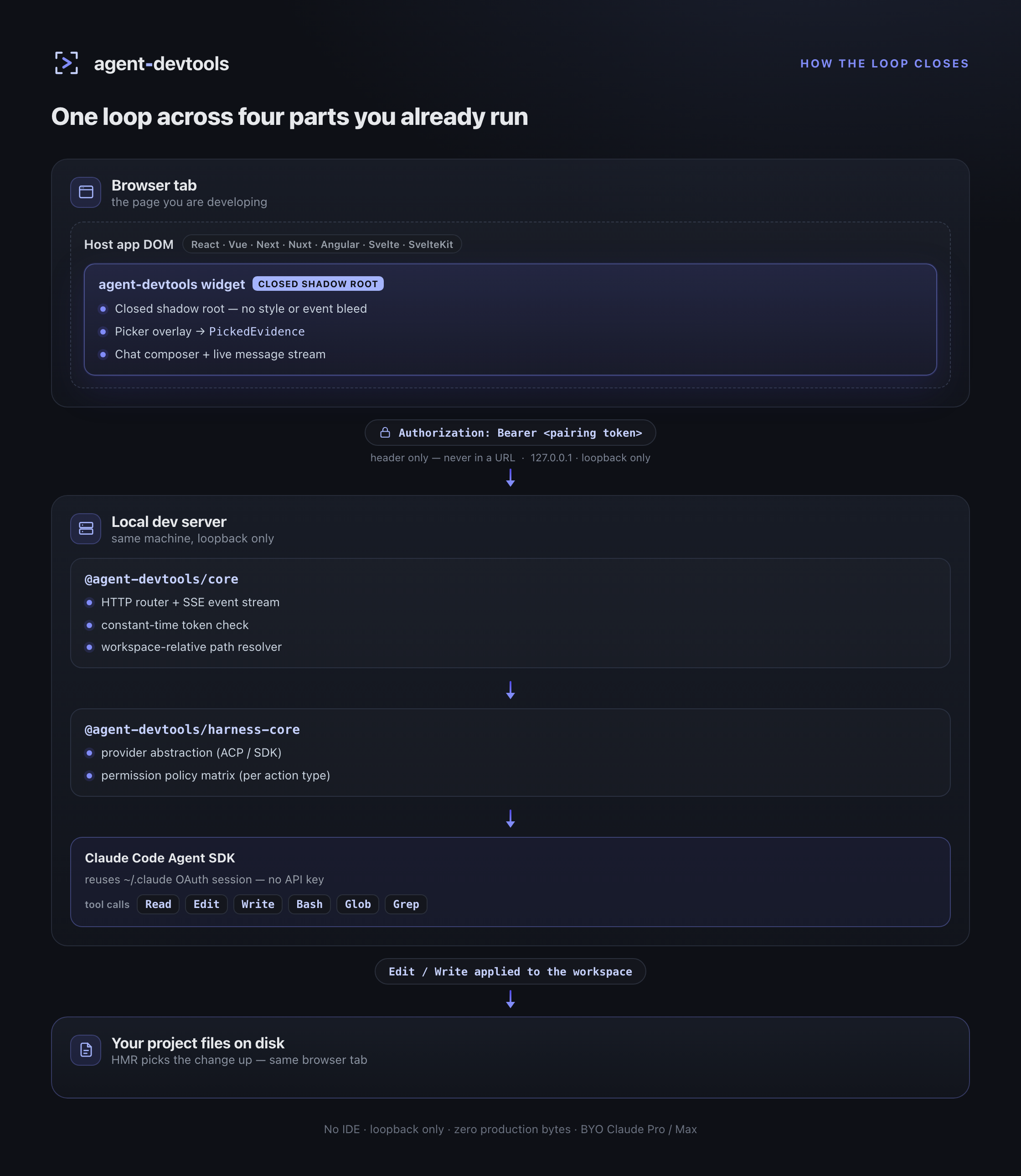
What each layer is doing
Section titled “What each layer is doing”Widget (browser)
Section titled “Widget (browser)”- Mounted by the framework adapter (
@agent-devtools/react,@agent-devtools/vue, etc.) only on the dev server. In production builds it never enters the bundle graph — see the security model for the 2-layer guard. - Runs inside a closed shadow root. No CSS variable, focus event, or scroll containment leaks into the host app.
- The picker walks the framework component tree (fiber, vnode, Ivy debug, Svelte meta) and reduces a clicked DOM node into
PickedEvidence—{ componentName, source: { fileName, lineNumber }, componentChain, outerHTML, selector }. - Sends prompts to the dev server through
fetch+ an SSE stream. The pairing token rides in theAuthorizationheader, never in a URL.
Loopback dev server (@agent-devtools/core)
Section titled “Loopback dev server (@agent-devtools/core)”- Binds to
127.0.0.1only. There is no external port and no reverse-proxy friendly mode. - Every request is checked against the in-memory pairing token (
timingSafeEqual). A new process means a new token. - Resolves every file path the agent touches relative to the project workspace and rejects anything outside it. This is the workspace guard called out on the security page.
Harness (@agent-devtools/harness-core)
Section titled “Harness (@agent-devtools/harness-core)”- Selects the provider — ACP (the default; spawns the local
claudeCLI) or SDK (the Anthropic Agent SDK). - Applies the action-typed permission policy.
fileEditisautoby default,bash/webFetch/mcpToolareask— see permission modes.
Claude Code Agent SDK
Section titled “Claude Code Agent SDK”- Reuses the OAuth session that already lives under
~/.claude/. agent-devtools never asks for an API key. - The agent uses the same tool surface as the CLI (
Read,Edit,Write,Bash,Glob,Grep). WhenEditruns, Vite / webpack / Vinxi pick the change up via their normal HMR pipeline — you see the result in the same browser tab you were chatting from.
Why it can stay safe
Section titled “Why it can stay safe”Three independent boundaries make the model honest, not three lines of marketing:
- 2-layer dev-only guard — build-time exclusion of the widget chain from production graphs, plus a runtime
NODE_ENVre-check. Detailed in security model → dev-only guard. - Loopback-only binding + pairing token — no externally-reachable surface, no token in URLs, constant-time comparison. Detailed in security model → pairing token.
- Action-typed permission policy — destructive tool kinds (
bash,webFetch,mcpTool) default to ask, even under permissive modes. Detailed in permission modes.
Where to read next
Section titled “Where to read next”- Installation — wire your stack in five minutes.
- Providers — ACP vs SDK — choose which Claude Code transport powers the loop.
- Security model — the full version of the boundary story.